

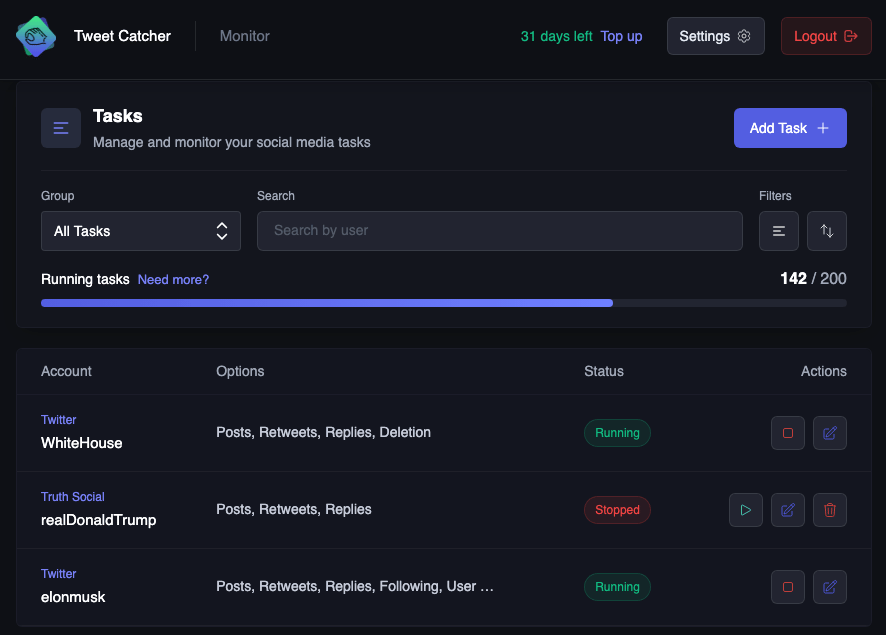
Reading a row
Task actions
Running limit
The counter above the list showsrunning / limit. Stopped tasks don’t count toward the limit, so you can keep as many saved configurations as you like
When you reach the limit, stop a task to free a slot, or click Need more? to buy extra task slots. See Plans for more informations
Find a task
Use the toolbar above the list to narrow it down:- Group shows tasks with a specific group label. All Tasks and No Group are always available. Set a task’s group in the Organization section when creating or editing it
- Search by user matches the account handle
- Status filters by All status, Running, or Stopped
- Sort orders the list by Newest first, Oldest first, A–Z, or Z–A
Restart tasks after a renewal
If your membership expires, your running tasks are stopped automatically. After you renew, the next login opens the Auto-Stopped Tasks dialog1
Choose what to do
Click Restart Tasks to start them all again, or Ignore to dismiss the dialog and leave them stopped
2
Wait for the restart to finish
Troubleshooting
A task won't start
A task won't start
Check that the handle is correct and no option is wrongly set. The error that prevents the task from starting will be shown to help you narrow down the cause
I can't find a task in the list
I can't find a task in the list
Reset the filters: set Group to All Tasks, Status to All status, and clear the search box.If you’re still getting notifications from a task you can’t find, the monitored user may have changed their handle, so it no longer matches the one on your task. To find the previous handle, look through your notifications for a handle change event
Some tasks are still stopped after a restart
Some tasks are still stopped after a restart
The tab was probably closed before the restart finished. Filter by Stopped and start the remaining tasks from the list